
Retail & office electronics
Source label printers from China
Label printer procurement starts with media, barcode readability, print volume and host software. Direct thermal and thermal transfer use different consumables and suit different labels. Compare the desired durability, width, print density and scanning performance with actual label stock and ribbons.
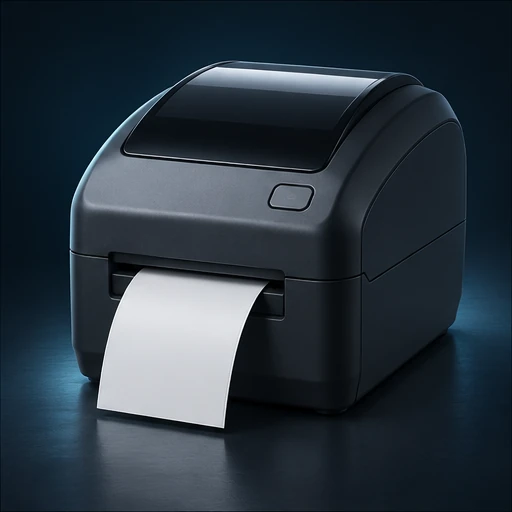
Label Printers by application
Choose the format that fits your buyer’s environment, operating requirements and support plan. Use the exact model identifier in every quotation and sample request.
Direct thermal desktop printer
Compare media compatibility, speed and readable output where the label only needs a defined service life.
Thermal transfer printer
Select ribbon and label stock together for durability, then test abrasion and the actual use environment.
Industrial duty printer
Specify continuous volume, media roll size, duty cycle, connectivity and service access.
Inside and outside the product
Explore the enclosure, interfaces and internal assembly. Open each component to see what it does and which design details affect sourcing.
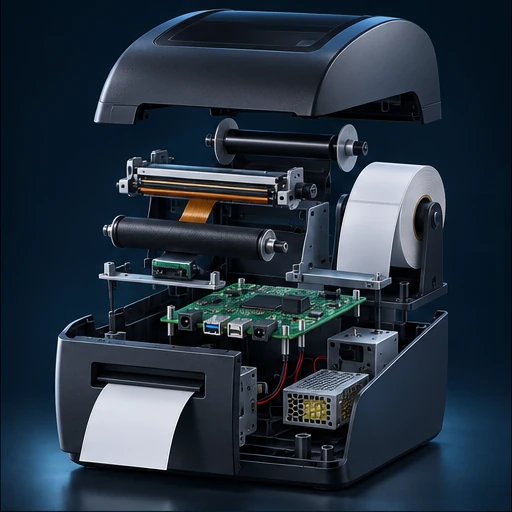
Printhead
Applies heat across the label width. Density and condition affect text and barcode detail.
Platen roller
Moves media at a controlled pace. Its alignment and surface influence tracking.
Media sensor
Detects gaps, marks or paper, depending on supported design.
Ribbon path
Transfers ink from ribbon on compatible units and manages winding.
Controller and chassis
Interpret host commands, manage heat and feed, and support media and interfaces.
Label Printers specification table
Ask each supplier to state a proposed value, supporting evidence and any deviation for the exact model it quotes. Measure samples under the same operating conditions before confirming the final configuration.
| Parameter | Specify or request from the supplier |
|---|---|
| Media | Specify width, thickness, roll and core diameters, adhesive, gap or mark and exposure. |
| Output | Define resolution, barcode specification, speed, durability and verification method. |
| Ribbon | Record transfer ribbon type, width and coating to match label stock. |
| Host | Confirm driver, printing language, USB or network and label editor integration. |
| Duty | State daily and peak labels, maintenance, head and roller replacement. |
| Package | Specify power supply, USB, cable, initial consumables and instructions. |
Compare the offer line by line
Compare installed cost by consumable and replacement part, including head and roller. Agree field support, print quality returns and compatible consumables.
Record unit price, minimum order by configuration, sample cost, lead time and quoted handover terms. Use the China import quotation checklist to compare the cost and inclusions of each offer.
From sample to shipment inspection
Agree the sample, test method and acceptance limits before releasing a production order. Build the report around the product’s expected use and the components that can change between lots.
Print sample labels
Use actual label files, stock and printer settings. Verify barcode readability, wear and heat or cold exposure as specified.
Production release
Lock printhead, controller and media sensor and approve packaging by model.
Lot checks
Run representative prints, inspect alignment and readability, feed and label detection and accessory count.
See how supplier selection and inspection coordination fit into the MOEWORLDWIDE sourcing process.
Documentation, packing and export
Document review
Review electrical and radio or EMC records by variant. Ask for durable label claims with a test method, stock and ribbon combination, and intended environment.
Freight and carton details
Prevent dust and crushing at media opening and printhead. Quote label and ribbon cartons separately and protect them from heat or humidity according to supplier guidance.
Confirm the commercial invoice, packing list, delivery term, cargo handover and any destination-specific documents with the parties responsible for the shipment.
Request a sourcing quote for label printers
Share the details below so MOEWORLDWIDE can compare offers on the same scope, including the supplied configuration, documentation, inspections and delivery terms.
- Application and market. Identify the direct thermal desktop printer, thermal transfer printer or another configuration you are evaluating, and name the destination country and receiving city or port.
- Product specification. Include your target values for media, output, ribbon and attach a current drawing, reference unit or datasheet if available.
- Order and packaging. List quantity by model, trial order size, likely repeat volume, required pack languages, accessories and target delivery date.
- Evidence and terms. List required reports, sample approvals, inspection scope, warranty expectations and preferred freight handover point.