
Retail & office electronics
Source POS terminals from China
Point-of-sale terminals need to run the intended retail software, accessories and payment workflow. Compare touchscreen register, kiosk and compact desktop formats using the real shop network and transaction process. Treat card acceptance equipment as a separate approved configuration when it is included.
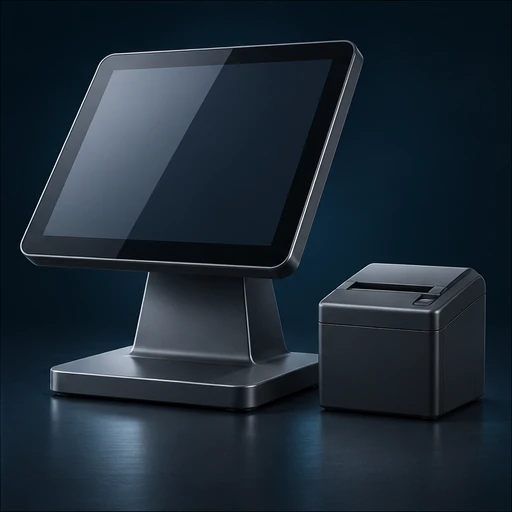
POS Terminals by application
Choose the format that fits your buyer’s environment, operating requirements and support plan. Use the exact model identifier in every quotation and sample request.
Countertop touchscreen terminal
Check screen angle, stand stability, operating image and port access for cash drawer, receipt and scanner.
Self-service terminal
Define mounting, authorized remote management, unattended operation and accessibility.
Compact register kit
Compare peripherals, counter footprint, offline operation and shipping weight.
Inside and outside the product
Explore the enclosure, interfaces and internal assembly. Open each component to see what it does and which design details affect sourcing.
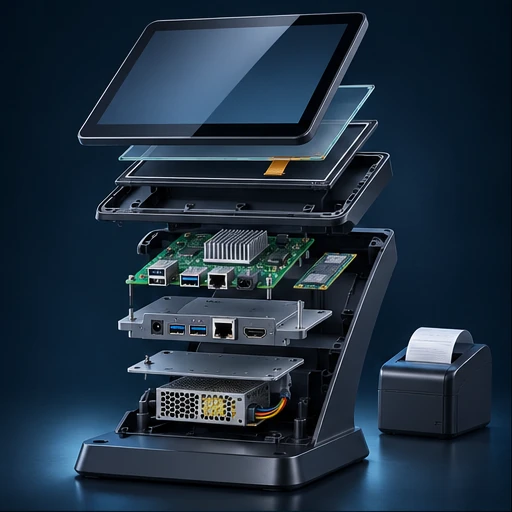
Touchscreen
Receives operator gestures and displays the checkout interface at the intended angle.
Compute and storage
Run software and retain authorized local data, depending on the system.
Peripheral ports
Connect printer, scanner, cash drawer, display and other devices through verified interfaces.
Stand and cable path
Secure the terminal and prevent cable strain at the counter.
Power supply
Supports boot, USB loads and any connected peripherals under the approved design.
POS Terminals specification table
Ask each supplier to state a proposed value, supporting evidence and any deviation for the exact model it quotes. Measure samples under the same operating conditions before confirming the final configuration.
| Parameter | Specify or request from the supplier |
|---|---|
| Software stack | Record OS, checkout application, licenses, device management and update requirements. |
| Peripherals | List exact printers, scanners, cash drawers, displays, adapters and connection or command modes. |
| Screen | Define size, resolution, brightness, touch accuracy, angle and stand or mount. |
| Power and network | Confirm input, port requirements, offline operation and recovery. |
| Payment | Identify exact separate or integrated approved payment component, acquirer and region. |
| Service | Specify spares, restore image, on-site handling and privacy controls for returns. |
Compare the offer line by line
Compare hardware, software, setup, site service and accessories separately. Define return and recovery steps when registers hold protected transaction data.
Record unit price, minimum order by configuration, sample cost, lead time and quoted handover terms. Use the China import quotation checklist to compare the cost and inclusions of each offer.
From sample to shipment inspection
Agree the sample, test method and acceptance limits before releasing a production order. Build the report around the product’s expected use and the components that can change between lots.
Pilot checkout
Use sandbox or test transactions and observe scanning, printing, startup and behavior with the network unavailable. Confirm display and cable access.
First article
Freeze OS image, board, display and complete peripheral kit. Confirm managed settings and quick-start config.
Shipment checks
Sample touch and ports, validate labeling and accessories, and reconcile serial and kit manifests.
See how supplier selection and inspection coordination fit into the MOEWORLDWIDE sourcing process.
Documentation, packing and export
Document review
Check electrical, radio and emissions evidence for the exact terminals. For a payment device, confirm exact model and configuration with acquirer and applicable payment approval records. Keep production payment credentials outside procurement samples.
Freight and carton details
Protect display, mount and spares as separate components. Use clear labels for peripheral bundles, adapters and market versions.
Confirm the commercial invoice, packing list, delivery term, cargo handover and any destination-specific documents with the parties responsible for the shipment.
Request a sourcing quote for POS terminals
Share the details below so MOEWORLDWIDE can compare offers on the same scope, including the supplied configuration, documentation, inspections and delivery terms.
- Application and market. Identify the countertop touchscreen terminal, self-service terminal or another configuration you are evaluating, and name the destination country and receiving city or port.
- Product specification. Include your target values for software stack, peripherals, screen and attach a current drawing, reference unit or datasheet if available.
- Order and packaging. List quantity by model, trial order size, likely repeat volume, required pack languages, accessories and target delivery date.
- Evidence and terms. List required reports, sample approvals, inspection scope, warranty expectations and preferred freight handover point.